
.jpg?width=700&height=467&name=etienne-boulanger-aafOjsh-9jU-unsplash%20(2).jpg)
We’re excited to introduce our new online claim submission feature that was designed with you in mind and will make filing claims easier than ever! This feature allows you to submit claim documentation online through our secure eService portal.
How to Submit a Claim Through eService
1. Take a picture of your claim documentation. The file format for these pictures must be PNG, JPEG, TIFF, or PDF. The writing on these documents must be clear and legible. These files will need to be accessible from the device you’re accessing the eService portal from.
2. Log into your eService account. If you do not have an eService account, you can create one using the instructions here.
3. Click on the Claims/Deductibles tab. There you will see a white Submit Claims button at the top of the page. Click this button to begin.
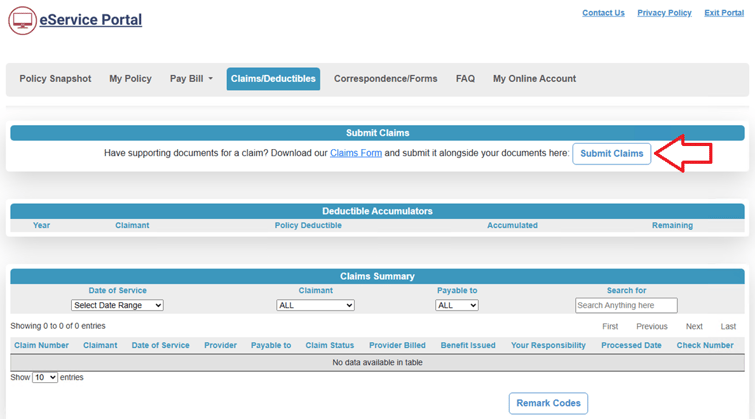
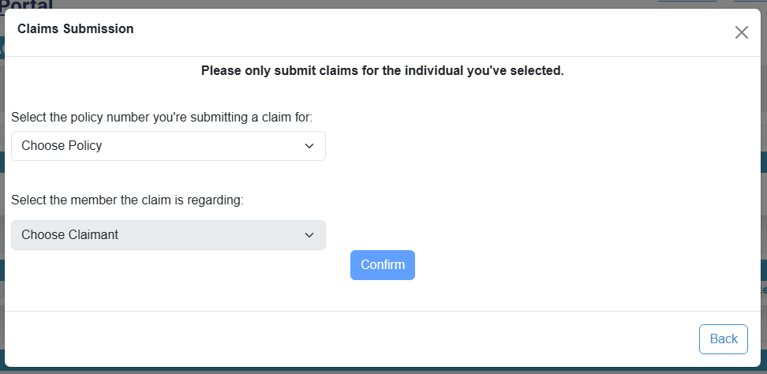
4. You will see your policy number and a drop-down menu listing eligible claimants. Select the claimant that corresponds to the documentation you are submitting. Click the Confirm button on this page.
5. On the next page, you can either drag and drop the relevant claim documentation or you can browse the files on your device. If you are submitting claims for multiple claimants, you will need to submit a claim form for each claimant.
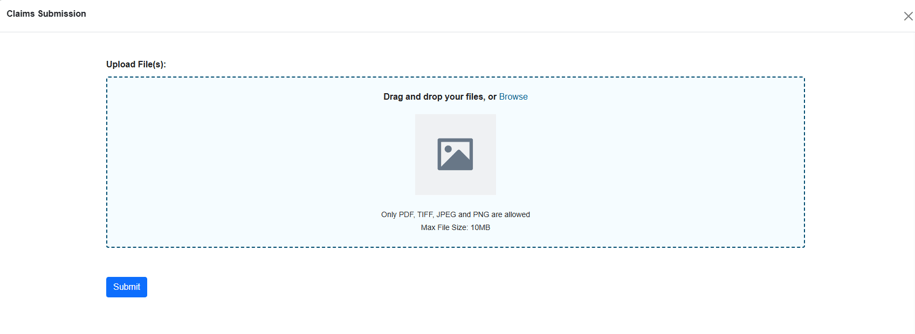
6. When you’ve selected your files, you will see them listed on the page. When you have all relevant documents, click the Submit button.
7. Once you click the Submit button, you will see a green checkmark indicating that the documents were successfully uploaded.

If you need to submit a claim, visit our eService portal today and see how easy claim submission can be!